Your Salesforce,
in plain English.
Query records. Visualize pipelines. Analyze meetings. Update data. Just ask — no SOQL, no dashboards.
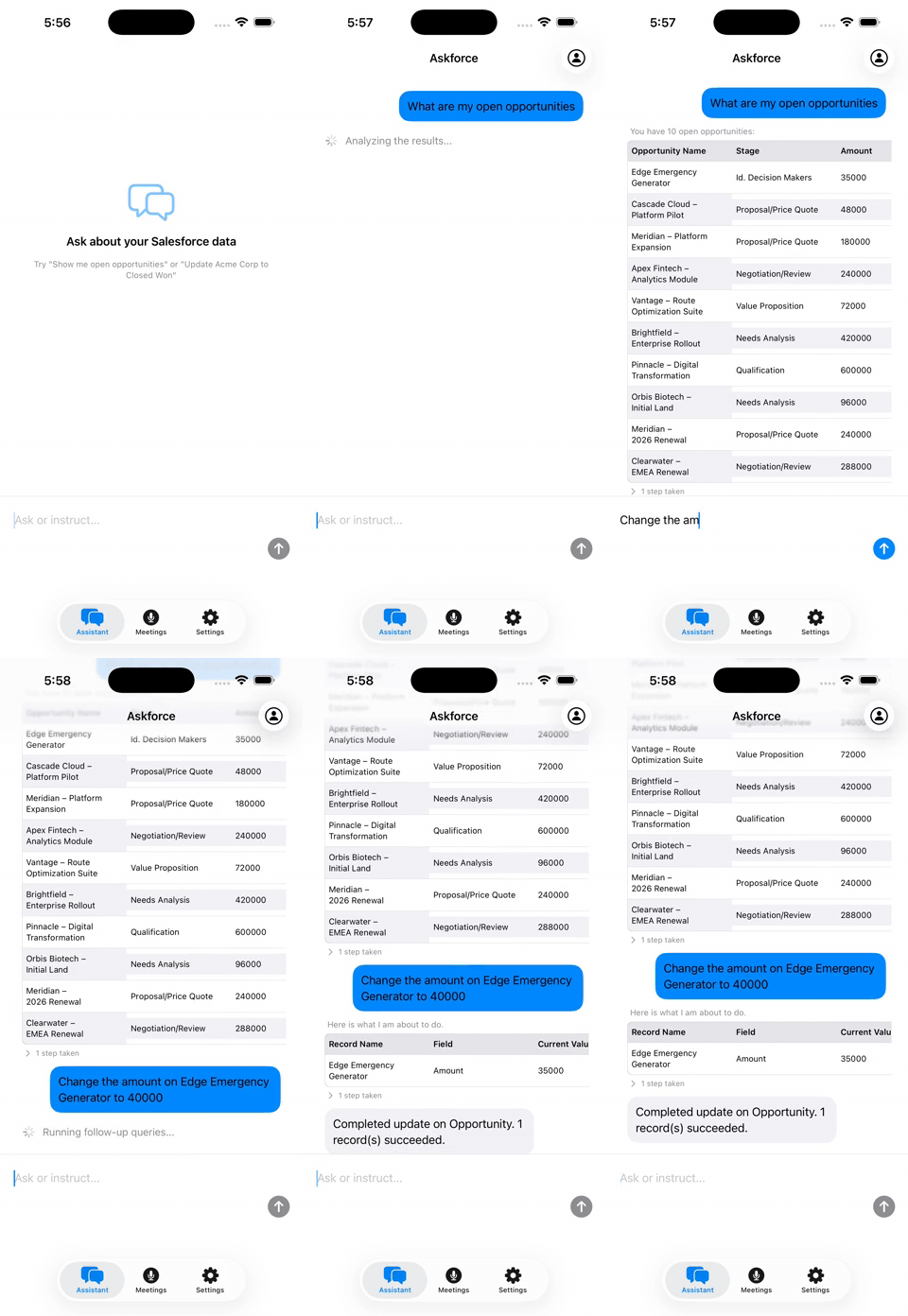
Sales
Query & update opportunities
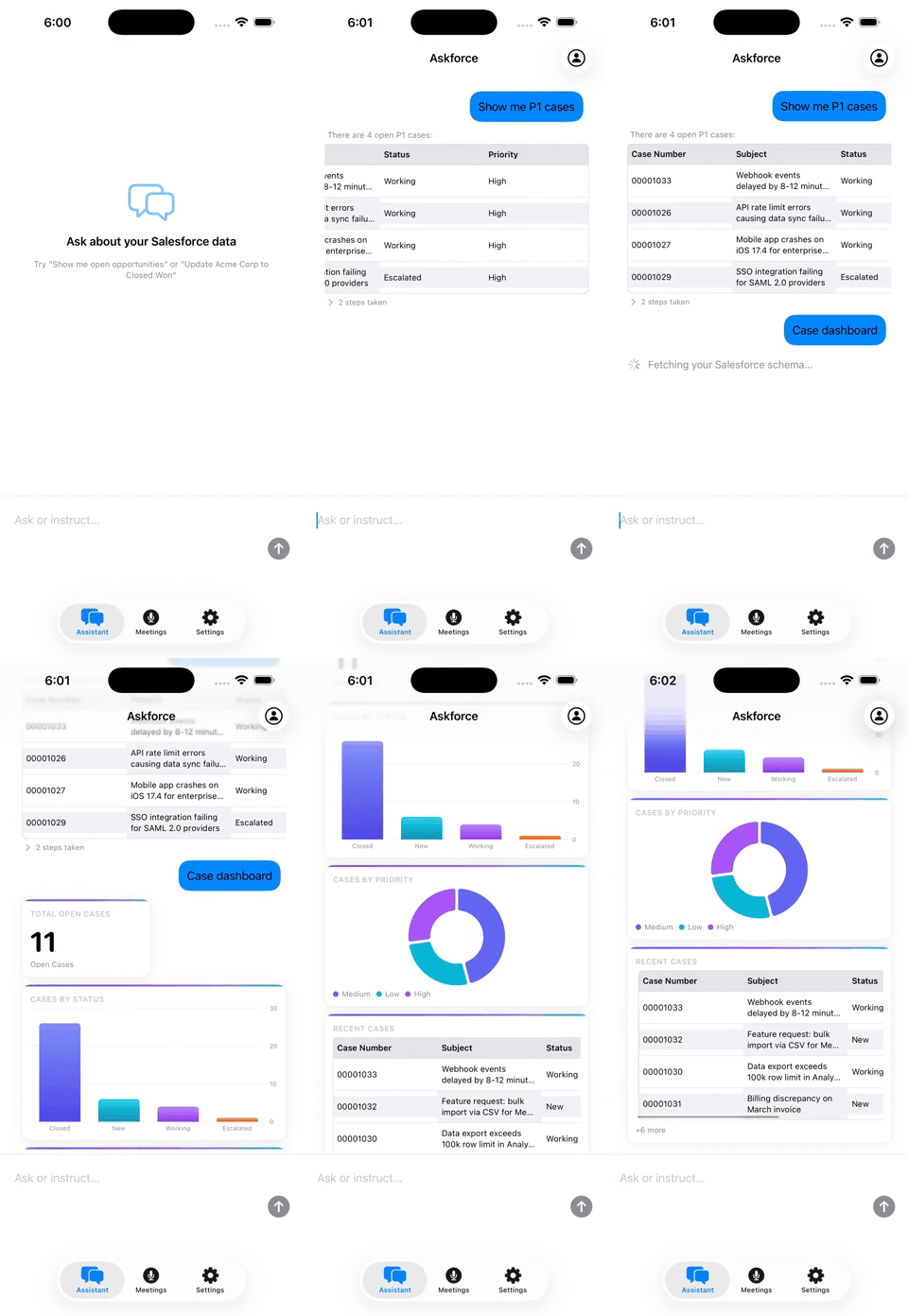
Service
P1 cases & live dashboards
Everything your Salesforce team needs
Natural Language Queries
Ask anything about your CRM
Skip the SOQL editor and the dashboard builder. Type a question in plain English and get structured answers in seconds — tables, summaries, or both.
- Searches across Opportunities, Accounts, Contacts, Leads, Cases
- Multi-step agent resolves ambiguous questions automatically
- Conversation history keeps context across follow-up questions
Found 5 opportunities closing in Q4:
Total: $381K
Data Visualization
Charts and dashboards, on demand
Don't wait for a report to be built. Ask for a bar chart, a pie chart, or a trend line and see it instantly — right inside the conversation.
- Bar, line, pie, and area charts from natural language
- Pipeline by stage, revenue by rep, deals by region — any grouping
- Export or screenshot your charts in one tap
Pipeline by stage:
Revenue by region:
Meeting Intelligence
Turn every meeting into Salesforce actions
Tap record before your next sales call. Askforce listens, segments speakers, extracts key decisions, and proposes the exact Salesforce updates to make.
- On-device speech recognition — no audio leaves your phone
- Multi-speaker detection with automatic name assignment
- Sentiment analysis, risk flags, and next steps extracted automatically
We discussed the Acme renewal — they want a 15% discount to extend for 2 years.
I can approve that. We should update the opportunity amount and close date.
Agreed. Also need a follow-up task for contract review.
AI Analysis
Safe Write Actions
AI proposes. You decide.
Askforce never touches your Salesforce data without your explicit approval. Every write action shows you exactly what will change — before it changes.
- Line-by-line diff before any field is updated
- Update close dates, amounts, stages, contacts in one confirmation
- Idempotency guard prevents accidental double-submits
I'll make these changes to Salesforce:
Opportunity
Acme Corp — Renewal
Meeting Intelligence
From conversation
to CRM update.
Most sales call notes never make it into Salesforce. Askforce closes that gap — automatically, accurately, and with your approval at every step.
Step 01
Record the meeting
Tap once to start. Askforce uses on-device speech recognition — no audio is ever sent to a server. Speakers are segmented automatically as the conversation flows.
Step 02
AI analyzes the transcript
The transcript is sent to the AI pipeline. It identifies sentiment, flags risks, surfaces key decisions, extracts follow-up items, and maps every action to a specific Salesforce record.
Step 03
Review proposed actions
A structured list of proposed Salesforce updates appears — update close dates, add notes, create tasks, change stage. Each one shows exactly what will change, and why it was suggested.
Step 04
Confirm and it's done
Select the actions you want to take. Tap confirm. Askforce writes directly to Salesforce — no copy-pasting, no switching apps, no context loss between the meeting room and the CRM.
Pricing
Simple, transparent pricing
Start free. Upgrade when you're ready. No credit card required to try.
Free Trial
Full access to explore every feature.
- 50 queries per day
- NLQ chat interface
- Charts and visualizations
- Meeting analysis (5 per trial)
- 1 Salesforce org
Individual Pro
For Salesforce users who need this every day.
- 100 queries per day
- Everything in Free Trial
- Unlimited meeting analysis
- Bring your own API key (optional)
- Priority support
Team
For sales teams that live in Salesforce.
- 500 shared queries per day
- Everything in Individual Pro
- Multi-user org access
- Team usage dashboard
- Dedicated onboarding
All plans include 1 Salesforce org. Cancel any time. No hidden fees.
Get early access to Askforce
We're onboarding beta users by invitation. Join the waitlist and we'll notify you when your spot opens up.
Early access
Be among the first to query and update Salesforce with plain English.
Shape the product
Beta users get direct access to our team and influence the roadmap.
Free during beta
No credit card, no commitment. Just early access while we refine the experience.